Node.jsでHerokuのSchedulerを使う
一定時間ごとにアプリケーションのAPIを叩きたかったのだけど、
どうやって実現したらいいのかしら…と思っていたらHeroku Schedulerなるものがあるらしい。
こいつぁいいぜー!と使おうとしたのですが、RubyのサンプルしかなくてNodeでどうやったら…状態で結構詰まったのでメモとして残します。
セットアップ
普通にサンプルアプリを作ってアドオンを追加します。
$ express cron-test
$ cd cron-test && npm install
$ git init
$ git add .
$ git commit -m "initial commit"
$ heroku addons:add scheduler:standard
スクリプトの作成
適当なディレクトリを掘って実行したいスクリプトを保存します。
今回 bin ディレクトリに test というスクリプトを保存しました。
$ mkdir bin
$ cd bin
$ touch test
$ vi test
スクリプトの中身はbashからNodeを呼んでいる感じ。
#! /app/bin/node
var http = require('http');

var options = {
  hostname: 'cron-test.herokuapp.com',
  port: '80',
  path: '/',
  method: 'GET'
};

var data = null;

var req = http.request(options, function(res){
  data = null;
  res.on('data', function(chunk){
    data += chunk;
  });

  res.on('end', function(){
    console.log('get response');
  });
});

req.on('error', function(e){
  console.log('problem with request' + e.message);
});

req.write('data\n');
req.end();
スクリプトがかけたらデプロイします。
$ git add .
$ git commit -m "add test script"
$ git push heroku master
Schedulerの設定
あとはHeroku Schedulerの設定画面からこのスクリプトを実行するように設定します。
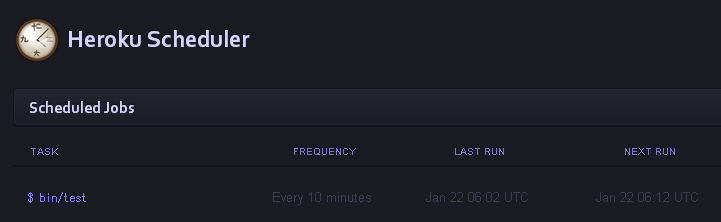
これで、10分おきにアプリケーションのルートにhttpアクセスが飛ぶようになります。
便利ですね :)
